I have recreated my portfolio for the third time
Ok so simply is the third time I have recreated my portfolio, and I am still not full satisfied with it. But I am happy with the progress I have made.
Start from the beginning
The first portfolio I created never got published, but it had so much potential. I never finished the project. I had used Svelte and SvelteKit as an excuse to approach the framework, and I had inserted a 3D model with Three.js, which looked very nice and aesthetic. However, I was probably complicating things by adding many aesthetic elements with little substance. The problem was not the developement itself, but the many ideas I had, and the fact that I was unable to complete anything or have clear ideas.
The project is now in my ‘deprecated projects’ folder, but I’ll leave you with a screenshot of the landing page.
The second portfolio
The second portfolio is completely different. I realised that web design wasn’t really my thing, so I looked for a solution or template to make the most of it. During a CTF, I was browsing some players’ Discord profiles and came across a portfolio by someone who was using GitProfile. I was initially impressed by it, and I didn’t waste any time creating my own profile. I started to configure it and got a discreet result. I liked it, but after several months, I started to get bored with it. I thought it was limiting and unprofessional.
The third portfolio (and the current one)
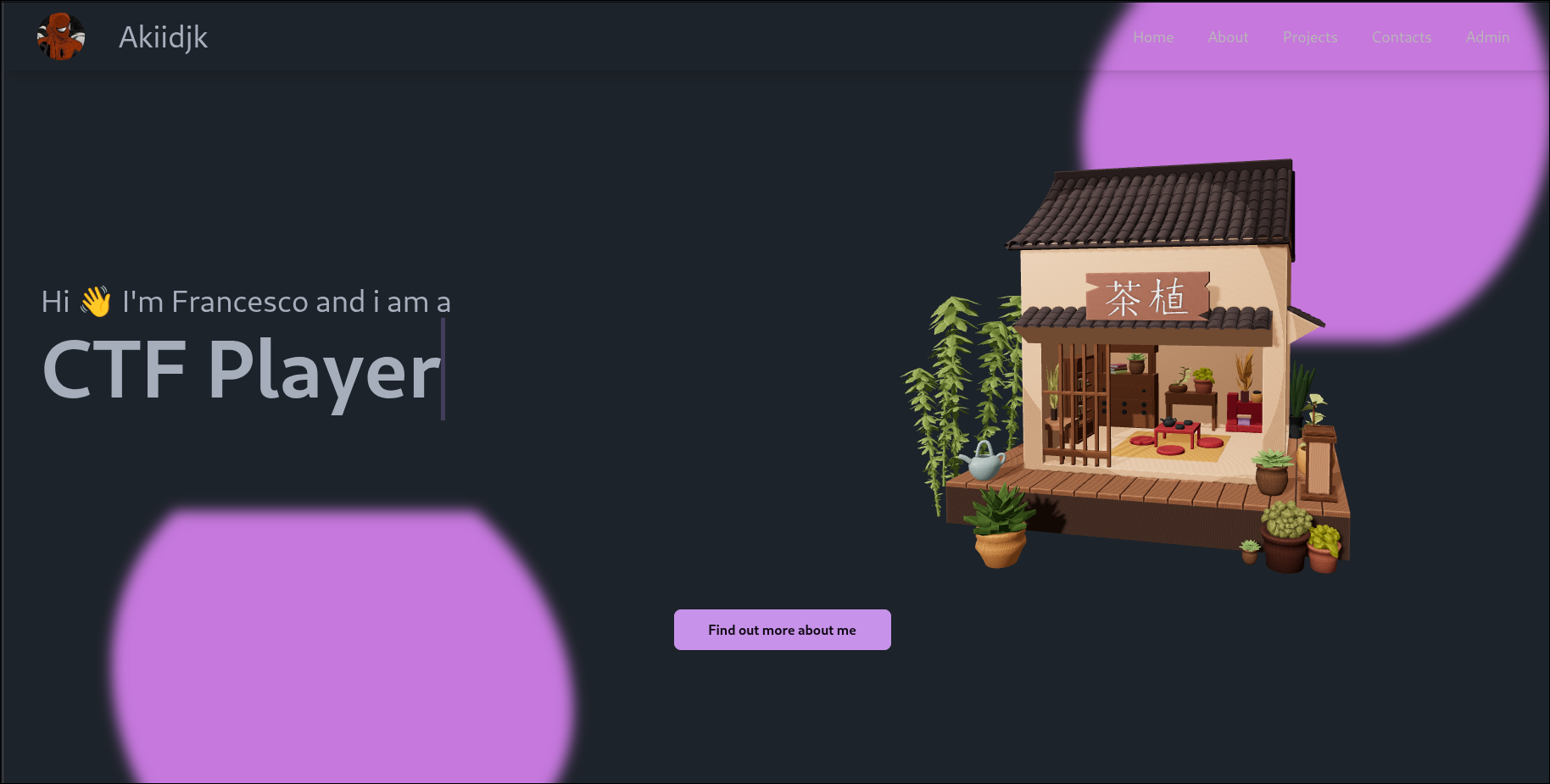
As with the second one, I was browsing the web when I came across a video about Astro, which I already knew about but had never really explored. I discovered that it was exactly what I was looking for, so I started to learn how it worked. Once I understood, I wasted no time and started creating a new portfolio (for the umpteenth time). Remembering that I’m a terrible web designer, I decided to use one of the templates offered by Astro. I found one that I really liked and customised it to my liking by making improvements and additions. The end result was very satisfying: I had created a portfolio that better represents me and that I can use to share knowledge.
A brief overview of the edits made to the template.
The initial template
The template I used was created by a very cool guy called @bytekai The template is called Minimal Astro Portfolio and is very minimalistic, which I really like. It is also very easy to use. It is not very well documented, but it is pretty easy to use. Also, the template name on the Astro website is Kaizen - Minimal Portfolio and ‘Kaizen’ is a word I love.
The changes I made
In short:
- Increased the font size by about 30%.
- Added a new section called ‘About’, which contains a brief description of myself.
- Added a new section called ‘Projects’ (not in the navigation bar), which lists my projects.
- Added a pfp to the nickname.
- Added a cool abstract image between the information and the other sections on the landing page.
- Changed the button
View full resumeto View my CV (previously it went to another page). - Changed the button
View my projectsto view all my projects (in the original, the page projects.astro is not implemented). - Added a cool search bar using
Pagefind - Removed the number of experience elements from the landing page.
- Deployed from GitHub Pages instead of Cloudflare, as I usually use GitHub Pages.
Other changes
This isn’t directly related to the template, but I created a useful Bash script to generate the content for the project page, so I don’t have to write it manually. The script is in the ‘scripts’ folder of the repository but for quick access.
#!/usr/bin/env bash

set -e

# Check for gum
if ! command -v gum &>/dev/null; then
    echo "Error: gum is not installed. Please install it from https://github.com/charmbracelet/gum"
    exit 1
fi

# Select content type
type=$(gum choose --header="Select content type" blog bookmarks notes projects experience)

# Get common fields
title=$(gum input --placeholder "Title")
slug=$(gum input --placeholder "Slug (file name, no spaces)")
description=$(gum input --placeholder "Description")

today=$(date %F)

# Helpers
get_tags() {
    gum input --placeholder "Comma-separated tags (tag1,tag2)"
}

get_bool() {
    gum choose "true" "false"
}

get_date() {
    gum input --placeholder "YYYY-MM-DD" --value "$today"
}

get_array() {
    gum input --placeholder "Comma-separated list (item1,item2)"
}

# Output path
outdir="./src/content/$type"
outfile="$outdir/$slug.md"
mkdir -p "$outdir"

# Build frontmatter
case "$type" in
blog)
    publishedAt=$(get_date)
    tags=$(get_tags)
    frontmatter="---
title: '$title'
description: '$description'
publishedAt: $publishedAt
tags: [$(echo "$tags" | sed "s/,/','/g" | sed "s/^/'/" | sed "s/$/'/")]
---"
    ;;

bookmarks)
    author=$(gum input --placeholder "Author")
    url=$(gum input --placeholder "URL")
    publishedAt=$(get_date)
    createdAt=$(get_date)
    typeField=$(gum input --placeholder "Type (e.g. article, video)")
    frontmatter="---
title: '$title'
type: '$typeField'
author: '$author'
url: '$url'
publishedAt: $publishedAt
createdAt: $createdAt
description: '$description'
---"
    ;;

notes)
    publishedAt=$(get_date)
    category=$(gum input --placeholder "Category")
    frontmatter="---
title: '$title'
description: '$description'
publishedAt: $publishedAt
category: '$category'
---"
    ;;

projects)
    url=$(gum input --placeholder "Project URL")
    featured=$(get_bool)
    techs=$(get_array)
    frontmatter="---
title: '$title'
description: '$description'
url: '$url'
featured: $featured
techs: [$(echo "$techs" | sed "s/,/','/g" | sed "s/^/'/" | sed "s/$/'/")]
---"
    ;;

experience)
    logo=$(gum input --placeholder "Logo path (e.g. /logos/foo.png)")
    startDate=$(get_date)
    current=$(get_bool)
    frontmatter="---
title: '$title'
logo: '$logo'
description: '$description'
startDate: '$startDate'
current: $current
---"
    ;;
esac

# Get content if applicable
if [[ "$type" != "bookmarks" && "$type" != "experience" ]]; then
    content=$(gum write --placeholder "Write content for the template")
else
    content=""
fi

# Write file
echo "$frontmatter" >"$outfile"
echo "" >>"$outfile"
echo "$content" >>"$outfile"

gum style --border double --padding "1 2" --margin "1" --foreground 212 "Created $outfile"
The gum script is a very cool tool for creating interactive command-line interface (CLI) applications. I use it to generate the content for the pages. The script is simple yet useful, as it saves me from having to write the content manually.
Conclusion
I am very happy with the result of this portfolio and hope you like it too. I learnt new things during the process and am looking forward to creating and sharing new projects with you. If you have any suggestions or feedback, please feel free to contact me.